In 2016, as a university student, I installed Plex on my gaming desktop and started serving local media off it. The desktop was an i7-4770K with a GTX 770, the first PC I’d built myself, back in 2013 at 15. Nine years later, that same Plex install has grown into a TrueNAS server running ~30 self-hosted apps, ~40 TiB of usable storage on a raidz2 pool (with a story behind that number, see below), and serving roughly 20 people across a few countries. None of it was planned. Every step came after the previous one started to break, and was paid for whenever the budget caught up.
Before Plex (2010–2016)#
I’d been torrenting since 2010. I was twelve, uTorrent was the client, and the workflow was strictly manual: pick the show or movie I wanted, search for it, find a healthy seed, download, watch. The uTorrent download folder was my entire media library. Half of it was things I’d already watched, half was things I was queuing up for the weekend, and the only “library management” was my own memory plus a TV Show Time account that kept track of which episode of which show I was up to.
This was the KickassTorrents era, and KAT was awesome - moderators, comment threads on every release, a community that would flag bad rips and call out fakes. The site got taken offline in a US-led operation in 2016, and the gap eventually got filled, for me at least, by private trackers, where ratios are enforced and quality gets policed much more directly. Tens of terabytes of seeding later, I’m still on the same ones.
Plex, when I found it in 2016, was the abstraction I’d been missing. It turned that flat folder of files into something I could actually browse - metadata, posters, subtitles, watch progress - and, more importantly, share with people who weren’t going to learn what .mkv meant.
The Gaming-Rig Era (2016–2020)#
The first version was the laziest possible setup: Plex on my main Windows desktop, drives merged with Windows’ built-in Storage Spaces so 2×1TB + 1×4TB looked like a single mount point, port-forward so a couple of family members could stream from outside. The “server” was whatever happened to be on the gaming PC at the time. I held out on Plex Pass until 2018, when I caught one of their 50%-off lifetime sales - still easily the best money I’ve ever spent on this whole project.
It worked exactly as well as you’d expect. Plex transcoding is CPU-bound, gaming is GPU-bound, but they both fight for memory bandwidth and disk IO. Three people watching from outside the house on shaky connections, and my gaming session noticed. I could pause my game, kick people, or accept that nobody’s experience was going to be great. But to be honest, this did not happen that often back then.
The i7-4770K as Always-On Server (2020–2023)#
In 2020, with my first salary out of university, I bought a new gaming desktop - Ryzen 9 5900X, RTX 2060 Super - and “retired” the i7-4770K. Retired meaning “moved to a corner with the drives still attached and never turned off again.” First time the home server became a separate machine from my gaming PC.
The stack matured a bit. Sonarr and Radarr came online (or maybe before, not entirely sure when I brought these on); access to a couple of decent private trackers and a few reliable public ones meant new media just showed up without me babysitting it. Parsec gave me remote access. Overseerr arrived later and took requests off my hands - friends and family could ask for content directly (I did share *arr access for a bit before this).
This is also when the user count grew past family, and transcoding got real. Three concurrent remote streams on the 4770K’s iGPU was the limit. I never wanted to disable transcoding entirely (some people had genuinely bad upstream connections), but the 4770K just didn’t have the headroom.
The whole thing was still on Windows. NTFS had a lot of data on it; a clean Linux migration was always “next year.” I knew Storage Spaces would haunt me eventually, but it kept working. Should I have just shipped the whole library to S3 and dealt with the migration cold? Probably. But moving 8 TB of Linux ISOs to a cloud bucket on a non-fiber upload is a project of its own (to be fair, we did eventually get fiber a year or two later).
In 2021 I bought my first 18 TB drive. Single drive, no redundancy, “I’ll figure out RAID later.” That made the eventual migration even more daunting with even more Linux ISOs to migrate!
The 2023 Reset#
By 2023 the smell was real. I wanted out of Windows, I wanted real ZFS, and I wanted a server that wasn’t living in fear of a Windows Update at 03. I also didn’t want to take the existing setup down while building the new one - there were ~16 people relying on this thing by then, and “your media is broken for two weeks” wasn’t something I wanted to do to anyone.
So I bought a used PC from a local secondhand site: Ryzen 7 5800X, RTX 3080, 64 GB of RAM. The point of the deal wasn’t the 5800X - it was the GPU and the memory. I swapped both into the 5900X gaming rig (which got a meaningful upgrade for almost nothing), stripped the used box down to CPU + motherboard + chassis, and stood it up next to the running 4770K as the new server. Built the new platform fully, copied data across, swapped people over. User-facing downtime was a few hours.
Why TrueNAS (and Not Unraid or Proxmox)#
Most homelab content for media servers points at Unraid: mixed disk sizes, single parity, paid license, very forgiving of “I bought one drive at a time over four years.” For someone whose drive collection grew organically - like mine had - Unraid is the obvious answer.
I went with TrueNAS Community Edition (formerly TrueNAS Scale) for three reasons.
ZFS is first-class. Unraid only added real ZFS support recently, and even then its core array layer is XFS-per-disk with parity. ZFS gives me snapshots, scrubs, send/recv, end-to-end checksums, and a pool layer I trust. After a year of running this I’ve caught zero silent bit-rot, but it’s the kind of thing you only know is working because nothing’s gone wrong.
All same-size disks anyway. My organic-growth phase ended in 2021. Going forward I knew I’d buy 18 TB drives until I died - they sit at the sweet spot for €/TB. Once you commit to one drive size, Unraid’s flexibility advantage evaporates and ZFS’s rigidity stops mattering.
The apps platform. TrueNAS’s built-in app catalog runs containers as first-class objects on the host, with iXVolumes (ZFS-backed) for app state. I don’t need a separate Proxmox + LXC + manual ZFS layer. One UI, one auth, one upgrade flow.
If you have ten differently-sized drives accumulated over a decade, get Unraid. If you’re starting fresh and willing to commit to one size, get TrueNAS. I did wipe my old non-18TB drives and sold them, by the way.
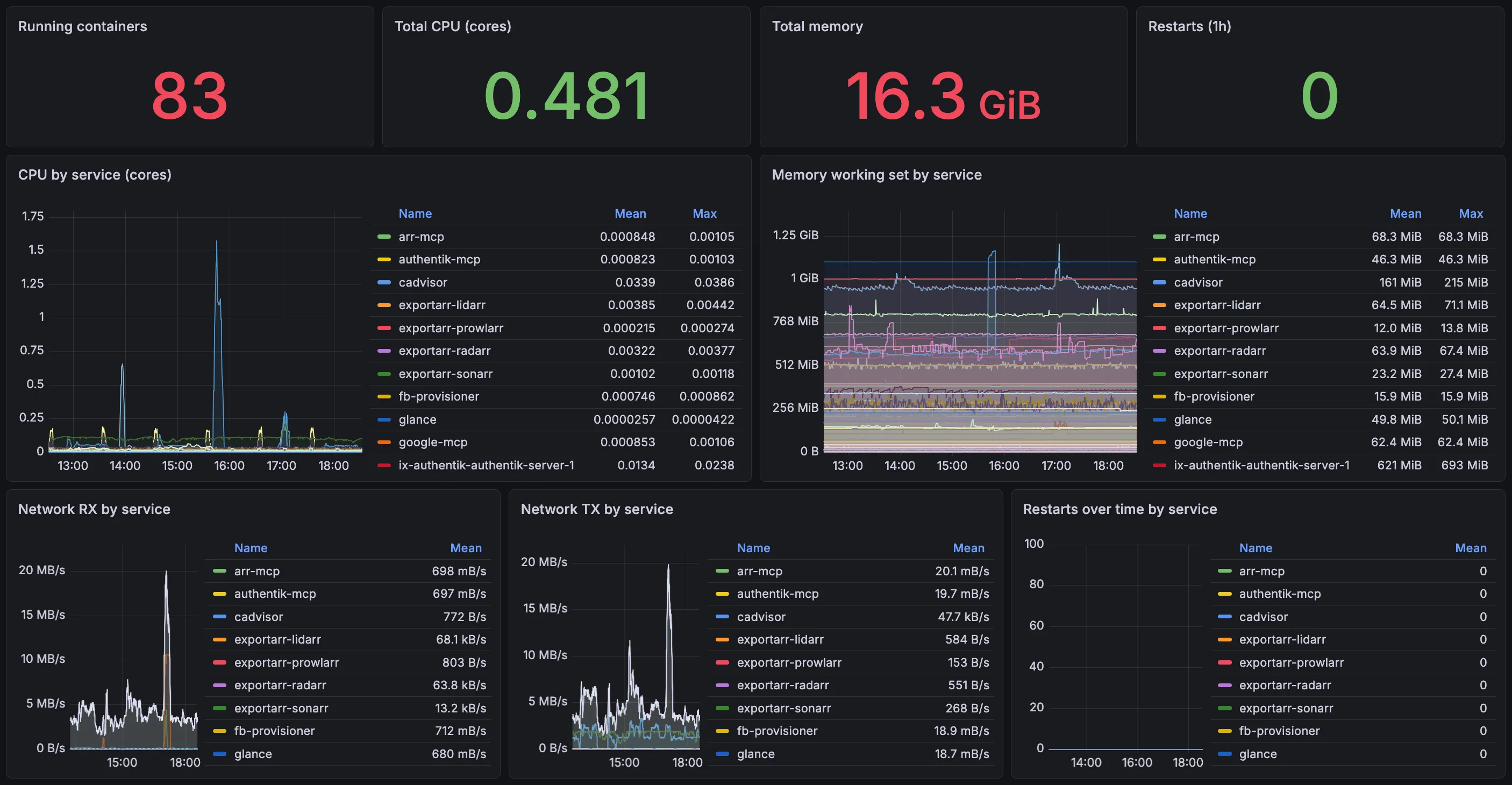
The Present: 5×18TB raidz2, ~30 Apps, 16 People#
Today the pool is five 18 TB Seagate IronWolf Pros in a single raidz2 vdev: two-disk redundancy, ~40 TiB usable today (currently ~79% full), with about 7 TiB stuck behind a legacy parity layout that I only noticed while writing this post - more on that further down. Single-vdev is fine here because the IOPS-sensitive apps run on a separate pool - ZFS scales IOPS per vdev, so a 5-disk raidz2 has the random-read throughput of roughly one disk, which doesn’t matter for sequential media streaming. Most of the drives came from ServerPartDeals, a recertified-disk shop that ships enterprise drives at a meaningful discount over new. Worked out at roughly half of new-IronWolf-Pro pricing, the trade-off being that the 5-year warranty runs from manufacture date rather than purchase date.
The host is on a UPS that easily handles half an hour of operation. Nothing’s port-forwarded anymore: family-facing apps come in through a Cloudflare Tunnel at *.afonsojramos.me (no exposed home IP, TLS handled at the edge), and everything admin - the *arrs, qBittorrent, dashboards, the lot - stays behind Tailscale. Two access tiers, one running it, the other consuming it. The stack, in rough shape:
- storage: 5×18TB raidz2 plus a separate
appspool for fast app state - media: Plex (1,400+ movies, 21 TB of TV, 874 GB of music), Jellyfin alongside it for redundancy (and external downloads, since the Plex Pass only allows Home User downloads), Tautulli for stats, Maintainerr for retention rules
- photos: Immich
- cloud: Seafile, plus Filebrowser and SMB shares for the unencrypted stuff
- auth: Authentik fronts SSO across the public apps and gates the admin tools behind a
homelab-adminsgroup; Wizarr atinvite.afonsojramos.meis the family onboarding door, bootstrapping both Plex and Jellyfin from a single invite - plumbing: Sonarr, Radarr, Bazarr, Overseerr, qBittorrent, Dockge, Glance, plus a handful of custom Dockge stacks for things the catalog doesn’t ship
The Drive Failure (Which Is Why raidz2)#
A few weeks ago, Scrutiny - the SMART dashboard I have watching the pool - lit up with UNC errors against /dev/sdd, one of the recertified IronWolf Pros (8,682 power-on hours, roughly a year of always-on, 18 TB), and a failed extended self-test soon after. It’s still online, but the pool reports READ=1 against it. The drive is firmly dying.
This is why raidz2 exists. With raidz1 (single-disk redundancy) you can lose another disk during a 4–6 day resilver window, which is a real risk: large drives mean long resilvers, the resilver itself stresses the remaining disks, and those remaining disks are also a year old and also from the same recertified batch. With raidz2 I can lose this one and another during the resilver and still be fine. The math on a five-disk pool of 18 TB drives wants two parity disks.
The drive came from ServerPartDeals; the RMA paperwork is in flight. The vdev still has both parity disks intact while I’m waiting on it, so the cost so far is “wait and watch.” And I’ve also ordered a new drive, which I’ll add to the pool once it arrives.
What Writing This Post Turned Up#
When I expanded this pool from 4-wide to 5-wide raidz2 with a zpool attach almost a year ago, I did the napkin math for the new geometry - 5×18 TB raidz2, ~49 TiB raw, ~44 TiB usable after ZFS overhead - and then never went back to check whether the running pool actually matched. The number sat in my head as fact for almost a year. Writing this section was the first time I’d looked at it again, and it turns out that that is not what I’ve been looking at at all.
I am currently getting ~40 TiB total, ~4 TiB short of the number I’d been carrying around since the expansion. Turns out that OpenZFS raidz expansion has a footnote I’d glossed over: it only changes the layout for new writes. Records already on disk keep their pre-expansion parity ratio forever. 4-wide raidz2 is 50% parity (2 of 4 disks); 5-wide is 40% (2 of 5). Everything written before the expansion still pays the 4-wide rate, and nothing in zpool or zfs will restripe existing records - not scrub, not resilver, not property changes. I had, honestly, assumed that that would be done in the expansion process, but it turns out that the only fix is to rewrite the data so ZFS reallocates it under the current geometry.
The tool for that is markusressel/zfs-inplace-rebalancing.sh: walks the dataset, copies each file to a sibling tempfile (no --reflink, so it’s a real fresh write), verifies size and checksum, atomic mv back over the original. Resumable across runs. Napkin math says I should reclaim about 7 TiB on ~36 TB of pre-expansion media - 36 × (1 − 40/50) = 7.2 - which would push the pool back past the ~44 TiB I’d always had in my head.
The catch: it’s a multi-day full-pool I/O storm, and /dev/sdd is exactly the wrong disk to be running it against. After replacing it I’ll need to resilver, scrub, and only then rebalance.
The takeaway, if you’re starting fresh: zpool attach raidz expansion is a one-shot operation you should plan around, not a casual capacity-add. Either commit to a rebalance pass after every expansion, or grow the pool by replacing all five disks one-by-one with larger ones (autoexpand=on), which keeps the geometry constant and avoids the legacy-tier problem entirely. Given /dev/sdd is going RMA anyway, the replacement could itself be the first 20 TB drive in a gradual disk-size upgrade - no parity-ratio drift, no rebalance debt, just bigger drives over time.
No Regrets#
Looking back, I don’t really have any. Self-hosting in 2016 was a much lonelier hobby than it is in 2026. No /r/selfhosted at its current size, no Tailscale, no TrueNAS Community Edition, no recertified-drive economy you could trust at scale, and homelab content on YouTube was a tiny fraction of what it is today. Most of what looks obvious in 2026 had to be figured out from scratch back then, and a lot of the choices that look “wrong” in retrospect were the only realistic option at the time.
The hurdles were also good for me. Storage Spaces taught me what I wanted from a real filesystem. Running Plex on my gaming PC taught me why isolation matters. The Windows years taught me what I was willing to pay for in operational simplicity. None of that would have landed the same way if I’d been handed today’s tooling on day one.
A few opinions that have held up, regardless of when you start:
- Storage Spaces is fine until it isn’t. Use it, then leave it before your library makes the migration scary.
- Don’t run Plex on your gaming PC. The moment your library has more than a couple of viewers, it deserves its own machine.
- Recertified enterprise drives are great once you trust the supplier. ServerPartDeals’ IronWolf Pros land at roughly half the price of new for the warranty trade-off.
- Pay for Plex Pass when it goes on sale. The 50%-off lifetime promos come around. Best deal in self-hosting. (Edit (29 May 2026): turns out, this was an even better deal than I thought, since from July 2026, Plex Pass will be available for 750$)
The thing the homelab guides on YouTube don’t tell you is that it never actually starts as a homelab. It starts as one Plex install on whatever’s nearest, and a few years later you catch yourself reading about ECC memory on a Sunday afternoon.